
How AI Really Helps With Information Overload
Information overload is a retrieval problem, not an input problem. How AI helps at the archive: spaced resurfacing, context, and cross-item synthesis.
Almost every article about AI and information overload describes the same job: filter the incoming stream, summarize what arrives, rank your inbox. That treats overload as a volume problem at the front door.
It is not. The expensive part is not what arrives. It is that everything you already saved never comes back.
The short answer
AI helps with information overload in two places. At the input, it filters and summarizes what arrives. At the archive, it brings back what you already saved, spaced over time and synthesized across many items. Nearly every tool does the first. The second is the one that stops saved material from going dead.
Only one of those two places is crowded.
At the input, AI filters, ranks, and summarizes what is arriving. This is what most tools do. It reduces how much you read today.
At the archive, AI brings back what you already saved — on a schedule you do not maintain, in a context where it is useful, and synthesized across many items rather than one at a time. This is what almost nothing does. It reduces how much you re-find, re-search, and re-learn.
If you have ever saved an article, screenshot, or PDF and never opened it again, more summarization will not fix that. The item was already short enough. It just never returned.
Why filtering and summarizing hit a ceiling
Input-side AI is genuinely useful and worth having. It also has a structural limit.
Summarizing compresses a single item at the moment you meet it. It assumes the decision you need help with is should I read this now. That is a real decision, but it is the cheap one — you are already looking at the thing, already in context, already interested enough to have opened it.
The expensive decision is the one you never get to make, because it never comes up: this thing I saved four months ago is relevant to what I am doing right now. No amount of front-door filtering surfaces that. You cannot summarize your way into remembering something exists.
So the stream gets tidier and the archive keeps growing, unread and unsearched, because the moment that would have made it useful passed without anything telling you.
What happens after you save: the part nobody measures
You will find confident numbers about how few saved links get revisited. We traced the ones circulating in search results, and they led to marketing blogs citing each other rather than to a study. We are not going to repeat them.
The honest version does not need a statistic. Check it yourself: open your browser bookmarks, your read-later app, or your screenshots folder, and scroll to anything from three months ago. Count how many you have opened since saving. That number is the actual problem, and you already know roughly what it is.
The mechanism behind it is not mysterious. Saving is a complete-feeling action. It closes the loop emotionally — you found something valuable, you did something about it — while doing almost nothing to make the item retrievable later. You were not organizing. You were deferring, and it felt like organizing.
What actually helps with information overload
Four mechanics address the archive side. If you want to manage information overload rather than just keep pace with it, these compound — each is weaker alone than in sequence.
1. Remove the cost of filing
Every organization system that requires a decision at save time eventually collapses, because the decision arrives at the worst moment — mid-task, mid-scroll, when you have no idea what future-you will call this. Folders, tags, and PARA-style hierarchies all pay this tax.
The alternative is to let capture be one action and have the system read, tag, and index the item afterward. You save. Something else does the filing. The archive stays searchable without you having maintained it, which matters because maintenance is the step people stop doing first.
This is the same reason AI screenshot organizers beat manual albums for anyone saving more than a handful of captures a week. If you keep captures in a note app today, screenshots vs note apps compares what each habit costs you.
2. Bring things back without being asked
Resurfacing is the practice of re-presenting saved material on an interval the user never sets, on the assumption that they have forgotten it exists. It is the opposite of search, which requires you to know what you are looking for, and the opposite of a reminder, which requires you to predict when you will need it.
The spacing effect is one of the better-established findings in memory research: material reviewed at spaced intervals is retained better than the same material reviewed in one block. It is the principle behind flashcard scheduling.
Applied to an archive rather than a study deck, it means the system should re-present saved items over time — not everything, not randomly, but on an interval that assumes you have forgotten and would not think to look.
The critical difference from a reminder app is that you never set anything. Reminders require you to predict, at save time, when an item will matter. You cannot do that. Spaced resurfacing removes the prediction.
3. Nudge with context, not at random
Here is where most resurfacing implementations fail, including some well-known ones. A saved item pushed at an arbitrary moment gets dismissed — not because it is irrelevant, but because it arrives while you are doing something else. Dismissal then trains you to ignore the whole surface, and the feature dies.
What survives is a nudge that carries a reason. Not here is a thing you saved but here is a thing you saved, and here is a question it answers. The reason gives the item a job in the current moment instead of asking you to invent one.
Practically: a resurfaced item should arrive with an entry point — a question to ask it, a related item to compare it against, a thread it belongs to. A bare item with no handle is a notification. An item with a handle is a prompt.
4. Synthesize across items, not one at a time
Per-item summaries do not scale. Fifty summaries of fifty saves is still fifty things to read, which is the original problem in smaller type.
The step that changes the math is synthesis across the set: what themes have accumulated, what you have been circling without noticing, what two saves from different months are actually about the same question. That is a report you could not have written yourself, because writing it would require rereading everything — which is precisely what you do not have time for.
This is also the point where an archive stops being storage and starts being a position on a topic. Researchers and marketers hit this constantly: the material for the argument is already saved, spread across weeks, unassembled. (How researchers capture, organize, and cite screenshots covers that workflow.)
What this looks like in SnapStash
SnapStash is a second-brain app for screenshots, links, and PDFs, built around the archive side of this problem. Concretely:
- Capture is one action. Save a screenshot, link, or PDF; the app reads it, extracts the text, categorizes and tags it. No filing decision at save time.
- Worth revisiting re-presents older saves on a spaced interval, so items return before you would have thought to look for them.
- Surprise me pulls something unexpected from the archive when you want serendipity rather than a schedule.
- Home Brief synthesizes across your recent saves into a short narrative with themes and suggested questions — the cross-item view, not per-item summaries. It refreshes weekly on Free and daily on Premium.
- Ask and Related appear on resurfaced items, so a returning item comes with a question to ask it or a neighbor to compare it to, rather than arriving bare.
- Search works in plain language, so retrieval does not depend on remembering the exact words you saved — how that works in practice.
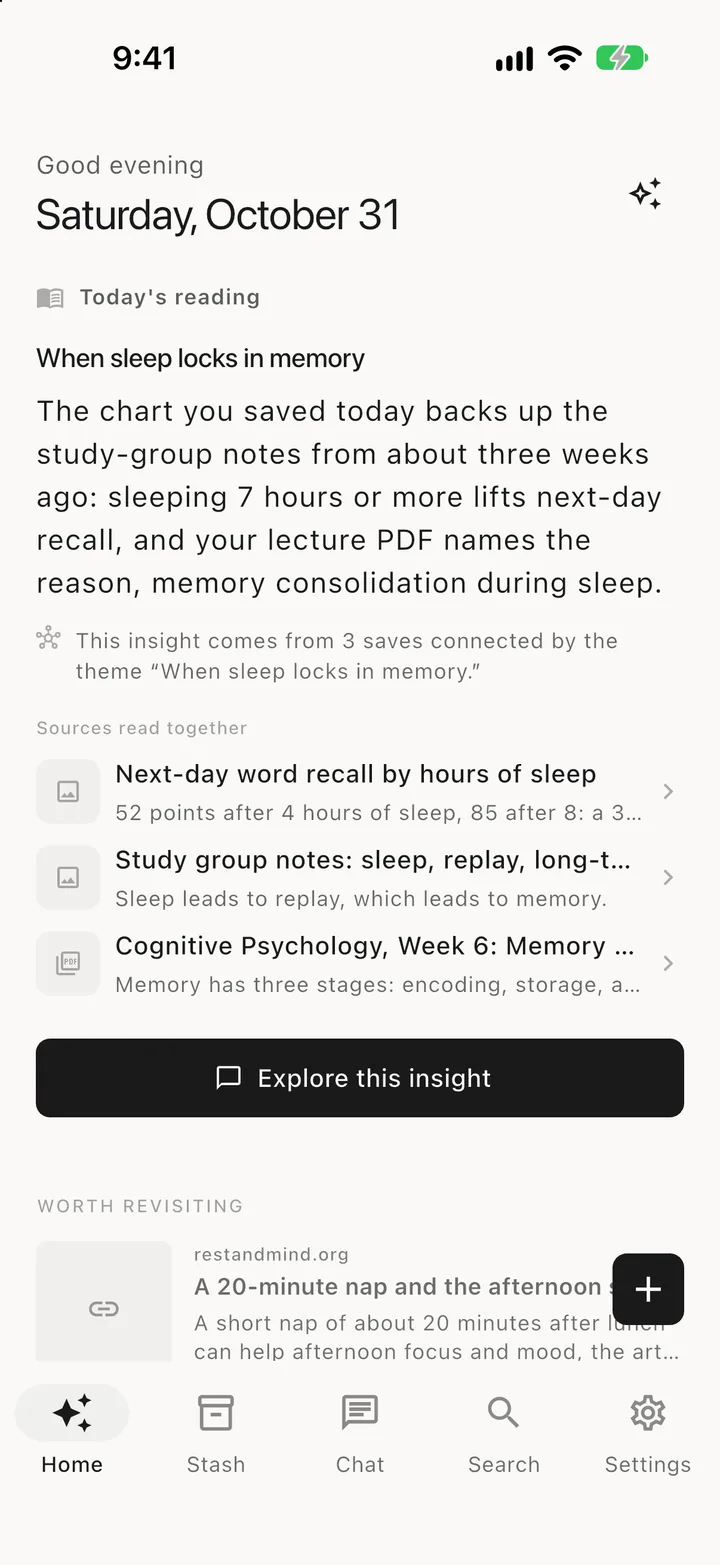
Free covers a recent window of your archive. Premium extends recall across everything you have ever saved, which is the version that matters if your saves are years deep. If you are assembling a longer knowledge system, the second brain guide covers the wider setup, and Discover handles the inbound side — finding things worth reading next.
Where this approach does not help
Worth being clear about the limits, because resurfacing is not a universal fix.
It does not help if you save almost nothing. With a small archive you can hold the whole thing in your head. The machinery is overhead.
It does not replace deliberate study. Spaced resurfacing improves the odds an item comes back at a useful moment. It does not make you learn something you never engaged with in the first place.
It does not fix bad capture. A screenshot with no source URL is still hard to cite months later, whatever brings it back — a separate problem we covered in how to cite a screenshot.
It will annoy you if it is tuned badly. Resurfacing that ignores context is just notification spam with extra steps. That is a real failure mode, not a hypothetical one.
FAQ
How can AI help manage information overload?
In two places. At the input, it filters and summarizes what arrives, reducing how much you read now. At the archive, it brings back what you already saved — spaced over time, with context attached, and synthesized across many items. Most tools only do the first. The second is what stops your saved material from going dead.
Is information overload really a retrieval problem?
Largely, yes. The felt cost is rarely that you read too much on a given day. It is that you cannot get back to the thing you know you saved, so you search for it again, fail, and re-read something new instead. That is retrieval failure presenting as overload.
Why don't summaries fix information overload?
A summary compresses one item while you are already looking at it. The problem is items you are not looking at and have forgotten you have. Summarization operates at the wrong moment.
What is the difference between resurfacing and reminders?
A reminder requires you to decide, at save time, when something will matter. You cannot predict that. Resurfacing removes the prediction: the system re-presents items on an interval and attaches a reason for looking now.
Does this work for screenshots and PDFs, or only articles?
Any saved item with extractable content. Screenshots and PDFs are often the worst offenders precisely because they are the hardest to search — a screenshot is pixels until something reads the text inside it.
Do I need to organize anything for this to work?
No, and that is the point. Systems that require filing at save time are the ones people abandon. The archive should be searchable and resurfaceable without you having maintained a structure.
How do I stop information overload for good?
You do not stop the volume — that is outside your control. What you can change is the return rate on what you keep. Reduce the cost of saving, let the archive resurface itself, and stop treating a full inbox as the thing to fix. The overload usually eases once saved material starts coming back instead of accumulating.
The takeaway
Overload is not the volume arriving. It is the gap between what you have saved and what you can actually get back.
Input-side AI narrows the stream. Archive-side AI closes the gap — by removing the filing cost, returning items on a spacing you do not manage, attaching a reason to look, and synthesizing across the set into something you could not have assembled by hand.
If your saved material is currently a place things go to be forgotten, more summarizing will not change that. Something has to bring it back.
Try SnapStash free — save screenshots, links, and PDFs, and let your archive come back to you.
Stop losing what you save
SnapStash reads every screenshot, link, and PDF you save, so you can find it again in the words you actually remember.
Related Articles
AI Knowledge Management: How Smart Storage Works
AI knowledge management reads what you save, tags it and finds it by meaning. See how smart storage works for screenshots and notes, and what to look for.
How to Build a Second Brain with Screenshots
Build a second brain from the screenshots you already take: capture on purpose, let AI read and tag them, then find and reuse them by asking.
AI Screenshot Organizer: Find Saved Screenshots Again
See how AI screenshot organizers use OCR, tags, summaries, and natural-language search to turn saved captures into reusable knowledge.